Arkansas Storm Team
- 4.4
- Rating
- 50.00K
- Installs
- Free
- Price
 Analysis by App-foxy
Weather apps are easy to overlook until the forecast matters right now. I spent time using Arkansas Storm Team as a local weather companion, and my overall impression is that it is most useful when you want Arkansas-focused information without sorting through a broad national service. It is a free weather app from Nexstar Inc., rated for Everyone, and its local identity is much clearer than what I usually get from a general-purpose forecast app.
That focus is also the key to understanding it. I would not choose it simply because I wanted another generic forecast screen. I would choose it when local conditions, changing skies, and storm awareness are more important than a huge collection of worldwide weather tools. The app has a 4.4 average from around 2.4 thousand ratings, with over 50 thousand installs, so it has built a meaningful audience without feeling like an anonymous utility.
How clearly the app presents weather information
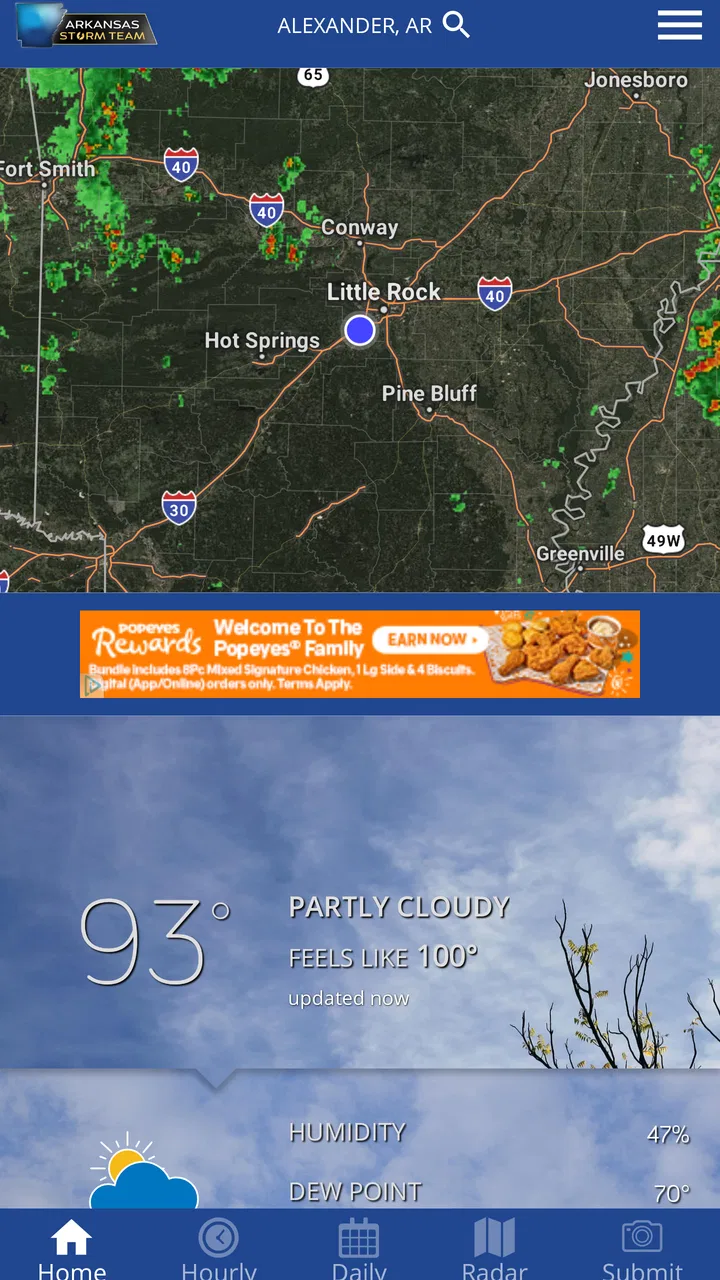
The first thing I noticed was how much a weather app depends on visual hierarchy. Forecasts are only helpful when I can quickly identify the current conditions, the next change, and the information that deserves attention. Arkansas Storm Team works best when I use it as a quick check rather than trying to study every weather detail at once.
You May Also Like

 Pandora - Music & Podcasts
Pandora’s Music Is Easy to Start, but Harder to Recover
Pandora’s strength is its low-effort path from a seed to a station. Its weak spot is how much confidence it asks you to place in connection, setup, and quiet recovery.

 8 Ball Pool
 Is Built on Rivalries, Rematches, and Routine
A close look at the rivalries, rematches, shared routines, and unanswered safety questions that turn a quick pool match into a persistent mobile community.

 Samsung Music
’s Quiet Strength Is Playing What You Already Own
Its reach comes less from spectacle than from dependable access to a personal library. That simplicity is both the app’s strongest retention engine and its ceiling.

 AccuWeather: Weather Radar
AccuWeather Review: A Quick, Clear Forecast for Everyday Decisions
For everyday plans, the best forecast is the one you can understand quickly. AccuWeather makes rain timing, radar, and local conditions easy to act on, with a few trade-offs.

 Hill Climb Racing
Why Hill Climb Racing Still Turns Crashes Into One More Run
A tiny car, a bumpy hill and one more upgrade: Hill Climb Racing keeps resurfacing because its simple chaos makes every near-miss feel personal.

 AliExpress - Shopping App
AliExpress Makes Global Shopping Feel Personal, but Shoppers Bear the Risk
AliExpress turns a global marketplace into a pocket-sized discovery engine. Its reach is useful, its shopping loop compelling, and its trade-offs easy to miss.
More From Our News Desk
View All News


That makes the app a practical fit for someone who wants a local forecast before leaving home, planning a drive, or deciding whether outdoor work can wait. The Arkansas emphasis gives the experience a more relevant starting point than a worldwide weather service, especially for users who care primarily about conditions in their own area.
I also appreciate that the app does not need a complicated learning period. A person who has used a weather app before should understand its basic purpose quickly. The more important habit is learning where the most urgent information appears and checking the forecast again when conditions are unsettled, rather than treating one glance as a guarantee for the entire day.
For readability, the strongest approach is to use the app in short sessions. I find that easier than leaving it open and repeatedly scanning the same screen. If the weather is changing, I check before going out, then check again before a longer trip. This simple routine reduces the chance that an earlier forecast becomes the basis for a later decision.
The current version is 6.2.512 and it requires at least OS 9. That makes the app accessible to people using relatively older supported devices, although anyone with an especially old phone should still check compatibility before planning around it. The free price also removes a common barrier: I can try it for local usefulness without committing to a subscription.
Navigation that suits quick decisions
In my experience, weather apps are most successful when they support three questions immediately: what is happening now, what is likely to happen next, and whether I need to change my plans. Arkansas Storm Team is best judged against that practical standard rather than against apps designed to overwhelm users with technical weather layers.
That matters for people who find dense interfaces tiring. A forecast can become inaccessible in practice when every screen competes for attention. I would recommend opening this app with a specific purpose, such as checking the morning outlook or reviewing conditions before driving, instead of treating it as an endless information feed.
There is also a useful distinction between readability and completeness. A concise local forecast may be easier to understand than a screen packed with charts, but people who want detailed atmospheric data may prefer a specialist weather service. Arkansas Storm Team feels more appropriate for everyday decisions than for someone who wants to analyze weather as a technical hobby.
Using it with different abilities and in different situations
Accessibility is not only about formal settings. It is also about whether a person can use an app when their attention, vision, hearing, movement, or surroundings are less than ideal. I cannot treat Arkansas Storm Team as a replacement for a dedicated accessibility tool, but I can assess where its local focus helps and where users may need a second method of checking important information.
Readability for vision and attention needs
Weather information should be readable under ordinary, imperfect conditions: bright daylight, a moving car passenger seat, a rushed morning, or a tired evening. I find that the app makes more sense when I concentrate on the main forecast information rather than trying to absorb everything at once. Users with low vision may benefit from the phone’s own text and display adjustments, but those system tools cannot fix every layout or contrast issue inside an app.
For people with attention difficulties, a local weather app can be less mentally demanding than a broad service filled with international locations, news, maps, and optional layers. The trade-off is that a simpler workflow may provide less control for users who want to customize every detail. I would test the app during calm weather first, while there is time to learn where the important information is located.
People who have difficulty distinguishing colors should avoid relying on color alone when interpreting weather graphics. My practical advice is to read the accompanying wording and use the app alongside another trusted source when a color-coded visual is central to a safety decision. A visual cue is helpful, but it should not be the only thing guiding a decision about travel or outdoor activity.
Motor, hearing, and sensory considerations
One advantage of a weather app is that it can be checked in a few taps, which is helpful for users who find prolonged touch interaction uncomfortable. I would still avoid trying to operate it while walking through heavy rain, carrying groceries, or driving. The safer workflow is to check before leaving and stop somewhere appropriate if another look becomes necessary.
Users with tremors, limited reach, or reduced precision may prefer using the largest practical system display settings and keeping their phone in a stable position. That is not a special feature of this app, but it can make a meaningful difference with any touch-based forecast. If a person needs voice control, screen reading, or other assistive technology, the sensible step is to test the exact tasks they care about rather than assuming every screen will behave perfectly.
Weather information can also be stressful for people who are sensitive to sudden alerts, dramatic imagery, or frequent changes. I recommend creating a calm checking routine: look at the forecast at planned times, then return only when conditions or plans change. That approach keeps the app useful without allowing weather monitoring to become an exhausting constant activity.
For users who are deaf or hard of hearing, visual information is especially important. I would not depend on an audible cue alone for a serious weather decision. The app is more suitable when its written forecast and visible information can be checked directly, with an additional official emergency channel used when immediate warnings matter.
Everyday situations where the local focus helps
Consider a realistic morning: I am leaving for work, a child has an outdoor activity later, and the sky already looks unsettled. Instead of opening a national forecast and searching through several layers, I use Arkansas Storm Team to check the local outlook, decide whether outdoor plans need a backup, and look again before leaving in the afternoon. That workflow is simple, but it is exactly where a local app earns its place.
The same applies to gardening, commuting, errands, school runs, and weekend plans. A person who works outdoors may use it before starting a job and again before returning to a more exposed location. Someone planning a long drive can use it as a local checkpoint at departure and before reaching the next part of the route.
It is less convincing for a traveler moving between many states or countries. In that situation, I would rather use a service built around multiple saved locations and broader geographic coverage, then keep this app for Arkansas-specific context. The choice is not about which category is universally better; it is about whether local relevance or wide-area flexibility matters more that day.
What it does well for inclusive use
The app’s strongest inclusive quality is its straightforward purpose. A person does not need to understand meteorology to get value from a local forecast. The free price helps people who cannot justify another paid service, and the Everyone rating makes it suitable for households with different ages.
Its local orientation can also reduce unnecessary searching. Someone who is less comfortable navigating complex apps may find it easier to return to one familiar weather source than to compare several national dashboards. That benefit depends on the user’s location and expectations, but for Arkansas residents it is a meaningful practical advantage.
I also like the idea of using the app as one part of a layered routine rather than insisting it must do everything. Use it for everyday planning, confirm serious weather concerns through official emergency information, and keep a second source available for travel or highly detailed analysis. This approach is more inclusive because it recognizes that users have different needs instead of forcing one app to serve every situation.
Remaining barriers and honest limitations
The biggest limitation is that local focus can become a restriction. If I need highly detailed maps, specialized measurements, extensive international coverage, or advanced customization, a larger weather platform may be a better match. Arkansas Storm Team is easier to approach when I want practical local information, but that simplicity may feel limiting to experienced weather watchers.
Another barrier is the context in which the app is used. A small phone screen, glare, wet hands, weak attention, or poor connectivity can make any forecast tool harder to operate. I would not make a critical safety decision from a single app screen, especially when conditions are changing quickly. The app can support judgment, but it should not replace official emergency guidance or common-sense caution.
People who need a very specific accessibility workflow should test it personally. System-level tools may improve reading or touch control, but the real question is whether the user can complete the tasks that matter: opening the forecast, understanding the current conditions, finding the relevant local information, and checking it again without confusion.
There is also a human barrier that is easy to ignore: forecast uncertainty. Even a clear presentation cannot make weather perfectly predictable. I treat the app as a current planning aid, not a promise. For flexible plans, that is usually enough. For outdoor work, travel, or vulnerable family members, I build in extra caution and verify important developments through additional trusted channels.
Who should use it and who should look elsewhere
I would recommend Arkansas Storm Team to Arkansas residents who want a free, local-first weather app for daily decisions. It is particularly suitable for families, commuters, outdoor workers, and anyone who prefers a focused forecast over a national app crowded with optional features.
I would be more hesitant to recommend it as a person’s only weather tool if they travel frequently, need advanced weather analysis, depend on a specialized accessibility workflow, or want one app covering many regions. Those users may be happier with a broader service and can still keep this app as a local reference when they are in Arkansas.
The developer, Nexstar Inc., gives the app a recognizable local-news style of purpose, but I judge it mainly by how well it fits my routine. The around 732 written reviews suggest that many people have taken the time to comment, while the larger rating count gives the average a useful base. I would not let those figures decide for me, though; the important question is whether local weather information is the type of information I actually need.
My inclusive verdict
After using it as a practical weather companion, I see Arkansas Storm Team as a focused tool rather than a universal replacement for every forecast service. Its greatest strength is the combination of local relevance, a free entry point, and a workflow that can suit quick everyday checks. That makes it easier to recommend to Arkansas users who want useful information without turning weather into a technical project.
Its limitations are just as important. Users who need broad travel coverage, deep customization, or highly specialized weather data should compare it with a more comprehensive alternative. People with vision, motor, hearing, or sensory needs should also test the exact screens and routines they depend on, using their device’s accessibility settings where appropriate.
My recommendation is to use it as a clear local planning aid, not as your only line of protection during serious weather. For checking the day before work, school, errands, or outdoor plans, it earns a place on my phone. For complex travel, advanced analysis, or critical alerts, I would pair it with a broader or official source. That balanced role is where the app feels most useful and most responsible.
FAQs for Arkansas Storm Team
01What is the Arkansas Storm Team app used for?
The Arkansas Storm Team app is designed to keep users informed about weather conditions across Arkansas. It typically provides current temperatures, hourly and extended forecasts, interactive radar, severe weather alerts, and local forecast updates. It is especially useful when storms, tornadoes, flooding, or other rapidly changing conditions affect your area and you need weather information in one place.
02Does Arkansas Storm Team provide severe weather alerts?
Yes, severe weather information is one of the app’s most important features. Depending on your location settings and the app’s notification permissions, it can provide alerts for dangerous conditions such as thunderstorms, tornadoes, flash flooding, strong winds, and other weather threats. Users should enable notifications and location access if they want timely warnings relevant to their current area.
03Can I use the app to track storms with radar?
The app generally includes an interactive weather radar that helps users follow rain, thunderstorms, and storm movement in Arkansas. Radar views can be useful for checking whether precipitation is approaching your neighborhood and for estimating its direction. However, radar is not a substitute for official emergency instructions, and users should seek shelter immediately when an official warning is issued.
04Does Arkansas Storm Team require my location?
Location access is usually optional, but allowing it can make the app more convenient and relevant. With permission, the app can show forecasts and alerts for your current area instead of requiring you to search for a city manually. If you prefer greater privacy, you may deny location access and select locations yourself, although some location-based alert features may be limited.
05Is Arkansas Storm Team free to download and use?
Arkansas Storm Team is generally available as a free download for compatible Android and iOS devices. The core weather features, such as forecasts, radar, and local updates, are normally accessible without a purchase, although the app may display advertising or depend on an internet connection. Availability, supported devices, permissions, and specific features can vary by platform and region.
Pros
- Localized forecasts and alerts focused on Arkansas communities.
- Radar tools help track storms and changing conditions in real time.
- Severe weather notifications can support faster emergency preparation.
- Video forecasts provide useful context beyond basic temperature data.
- Clean layout makes daily weather information easy to find.
Cons
- Some advanced radar features may require a stable internet connection.
- Frequent severe-weather alerts can feel excessive during active storm periods.
- Forecast accuracy may vary in rural areas or rapidly changing conditions.
- The app may use noticeable battery and data when location is enabled.
- Availability and timing of alerts depend on the station’s coverage area.

Arkansas Storm Team
Gallery